

The short answer
Break-even camera days per month = monthly cost of owning ÷ cost of one rental day. If you expect more camera days than that, steadily, buying is cheaper. If you expect fewer, or can't predict them, rent.
| Your situation | Usually better | Why |
|---|---|---|
| Camera work every week, steady demand | Buy | Fixed cost is spread over many jobs; the camera is on the truck when the call comes |
| A few jobs a year, or a single project | Rent | No idle capital, no repairs, no storage |
| Adding sewer scoping to a business and unsure of demand | Rent first, then buy | Proves demand and the model; rental credit can reduce the purchase price |
| Odd job outside your usual pipe sizes (large mainline, long run) | Rent the specialty system | Owning a second system for rare jobs rarely pays |
| Cash is tight but the work is steady | Finance or lease, or rent-to-own | Matches payments to revenue; compare total cost, not the monthly payment |
What owning a sewer camera really costs per month
The monthly cost of owning is depreciation plus repairs, plus insurance and the cost of the money, not the purchase price divided by twelve. Put each line in your own numbers:
- Purchase price of the complete kit: camera head(s), push cable reel, control unit, plus anything you need for your jobs, such as a sonde locator or centering skids.
- Expected resale value at the end of the period you plan to keep it. A well-kept camera keeps some value; a camera with a worn cable and scratched head keeps less.
- Repair and wear reserve. Push cables, camera heads and springs wear with use, and repair costs vary by damage and model. Set aside a yearly amount based on your own history or a service quote, not a guess you hope is low.
- Insurance and storage: tool insurance and a dry place on the truck or in the shop.
- Cost of capital: the interest on financing, or what that cash would earn elsewhere in the business.
- Training: owning means your crew learns the system once and keeps the skill. That's a cost up front and a saving on every later job.
Monthly cost of owning = (purchase price − resale value) ÷ months you'll keep it + yearly repair reserve ÷ 12 + monthly insurance, storage and finance cost.
What renting a sewer camera really costs per job
A rental costs the daily (or weekly) rate plus getting the camera to and from the job, plus the damage risk you carry while you have it. Homeowner cost guides report typical drain camera rental rates of about $120–$225 a day and $350–$780 a week (HomeGuide; undated survey); Angi quotes about $200 a day for a sewer camera kit (Angi, 2025 data). Larger CCTV systems cost far more: one inspection-service vendor puts a standard CCTV pipe inspection system at about $1,000 a day to rent (GPRS).
Add the costs that aren't on the rate sheet:
- Pick-up and return time for a local rental, or shipping both ways for a shipped rental. At Fiberscope.net the customer pays shipping, and the rental period runs from the day you receive the unit to the day you ship it back, weekends included.
- Damage responsibility. Many rental agreements, including ours, make the renter responsible for repair costs; check whether your tool or business insurance covers rented equipment.
- Learning time. Every unfamiliar system costs setup time on the first job.
- Availability. A rental that isn't in stock the day you need it can cost you the job.
The break-even worksheet
Fill in the left column with your numbers; the break-even line tells you how many camera days per month make buying cheaper. The calculator below works the same lines for you if your browser runs scripts.
| Line | What to enter | Formula |
|---|---|---|
| A. Kit price | Complete kit you'd buy, with accessories | — |
| B. Resale value | What it's worth when you replace it | — |
| C. Months you'll keep it | e.g. 36 or 60 | — |
| D. Repair reserve per year | Cable, head, service | — |
| E. Insurance, storage, finance per month | Your actual costs | — |
| F. Monthly cost of owning | (A − B) ÷ C + D ÷ 12 + E | |
| G. Rental rate per day | Your rental quote | — |
| H. Extra cost per rental | Pick-up/return time, shipping, damage waiver | — |
| I. Days per rental | Days billed each time you rent | — |
| J. Cost per rented camera day | G + H ÷ I | |
| K. Break-even camera days per month | F ÷ J |
Two worked examples (illustrative)
These examples use assumed numbers to show the method; they are not quotes or measured costs. Replace every line with your own figures.
Example 1: entry-level push camera for a plumbing or home-inspection business
- Kit A = $4,500 (assumed: an entry-level self-leveling push camera package plus a locator and spares). Resale B = $1,100 after C = 36 months.
- Repair reserve D = $600 a year; insurance and storage E = $20 a month (assumed).
- F = ($4,500 − $1,100) ÷ 36 + $600 ÷ 12 + $20 ≈ $164 a month.
- Rental G = $200 a day (Angi's figure), H = $60 of pick-up and return time, I = 1 day: J = $260 per camera day.
- Break-even K = $164 ÷ $260 ≈ 0.6 camera days a month.
Even doubling the repair reserve only moves break-even to about 0.8 days a month. If you're booking camera work most weeks, the math favors buying, and the camera on the truck also lets you scope a line on the same visit instead of coming back.
Example 2: a large CCTV system for occasional mainline work
- Kit A = $70,000 (GPRS's "upwards of $70,000" figure for a CCTV system, a vendor claim). Resale B = $20,000 after C = 60 months.
- Repair reserve D = $3,500 a year; insurance, storage and finance E = $400 a month (assumed).
- F = ($70,000 − $20,000) ÷ 60 + $3,500 ÷ 12 + $400 ≈ $1,525 a month.
- Rental G = $1,000 a day (GPRS figure), H = $300 for shipping and handling, I = 3 days: J = $1,100 per camera day.
- Break-even K ≈ 1.4 camera days a month, every month, for five years.
The break-even looks low again, but here the risk is different: a $70,000 system that sits for six months between jobs still costs about $1,525 a month. For occasional large-diameter work, the question is less "rent or buy" and more "will I have this work every month?" If the answer is no, rent the system or subcontract the job.
Reasons to rent or buy that the math doesn't capture
The break-even number tells you when buying is cheaper; these factors tell you whether buying is wise.
| Factor | Points to buying | Points to renting |
|---|---|---|
| Demand certainty | Repeat customers, contracts, steady referrals | New service line, seasonal or one-off project |
| Response time | Same-visit inspection is part of your offer | Jobs are scheduled days ahead |
| Pipe range | Most jobs fit one system's range | The job needs a different head, larger diameter or longer cable than you own |
| Operator skill | Crew uses the same system every time and gets faster | You need to try a system before committing |
| Footage and reports | Consistent recording and report format across jobs | One-off documentation for a single client |
| Cash and risk | Cash or financing is in place; you can absorb a repair | Capital is needed elsewhere; you can't carry a repair bill now |
Also check what you can charge. Homeowner cost guides put a sewer camera inspection at a national average of about $280, with most jobs between $125 and $500 (HomeGuide); Angi's 2025 data shows a wider range and a higher average (Angi). Local prices differ a lot; use your own invoices. If the camera lets you sell a repair, a cleaning or a lining job, count that value too, but don't count it twice.
When not to buy yet
- You haven't booked a single paid camera job and have no clear source of them.
- Your jobs span pipe sizes no single system covers well (see our guide to choosing by pipe diameter).
- You're buying mainly because the monthly payment looks small; compare the total cost over the term.
Rent first, then buy: how rental credit changes the math
If part of what you pay in rent comes back as a credit toward the purchase, renting first costs less than it looks. Ask any supplier how rental fees are credited before you rent.
At Fiberscope.net, under the current Rental and Demo Policy:
- Rent-to-own: on eligible units, 50% of the rental fees you've paid is credited toward that unit's purchase price.
- Demo rental: if you rent a unit only to test a model and then buy a new system of a similar model, 100% of the rental fee paid is credited. You pay shipping both ways.
- No deposit; you sign a rental agreement and are responsible for repair costs if the unit is damaged. Rentals ship within the US and Canada.
In practice: rent the model you're considering for your next real job, see whether it fits your pipes and your workflow, and if it does, the rental fee becomes part of the down payment instead of a sunk cost.
Fiberscope equipment to consider
Three systems at three budget levels: a compact plumbing camera for small lines, a pan-and-tilt push camera for 2–20″ pipe and a battery-powered crawler for mainlines. Prices and specifications are as listed on their product pages in November 2026; each can be rented before you buy.
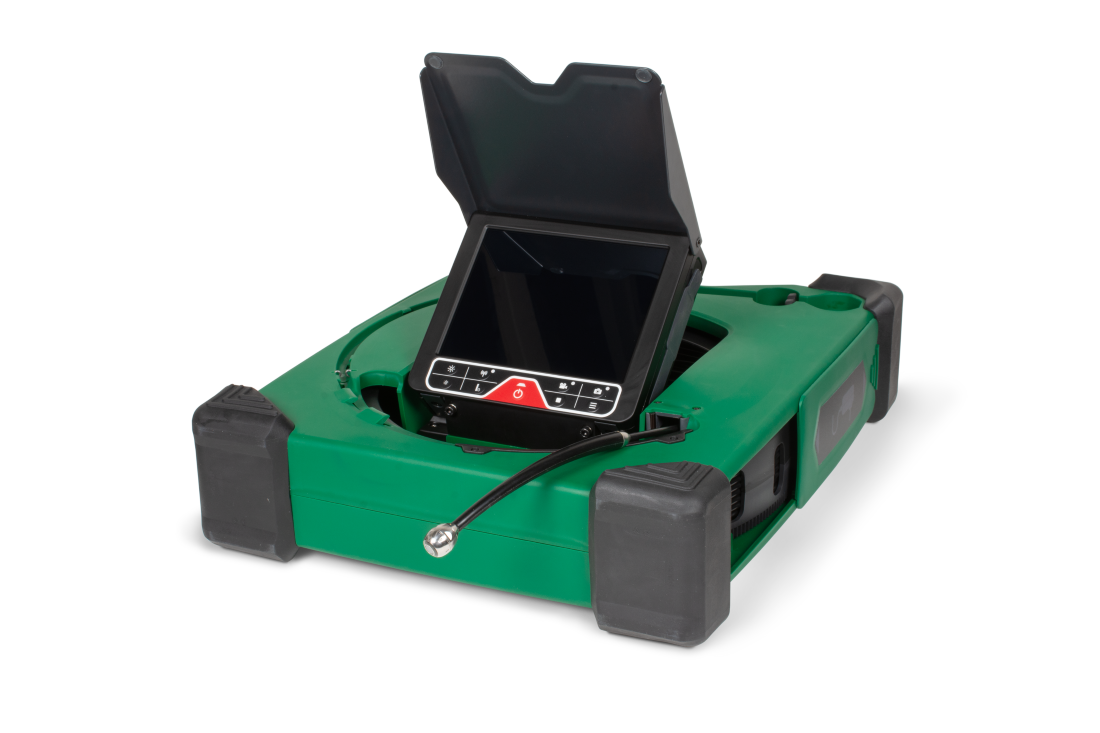
MiniFlex 2
For plumbers whose work is mostly small lines with traps and tight bends, where a camera on the truck pays off on everyday service calls.
- From $5,229 (19 mm straight-view head)
- 0.76″ (19.5 mm) head; passes multiple 90° bends in 1.5″ pipe; built-in 512 Hz sonde
- 65 ft or 131 ft push cable; 8″ touchscreen, image/video/audio capture, footage counter; up to 7 h portable operation
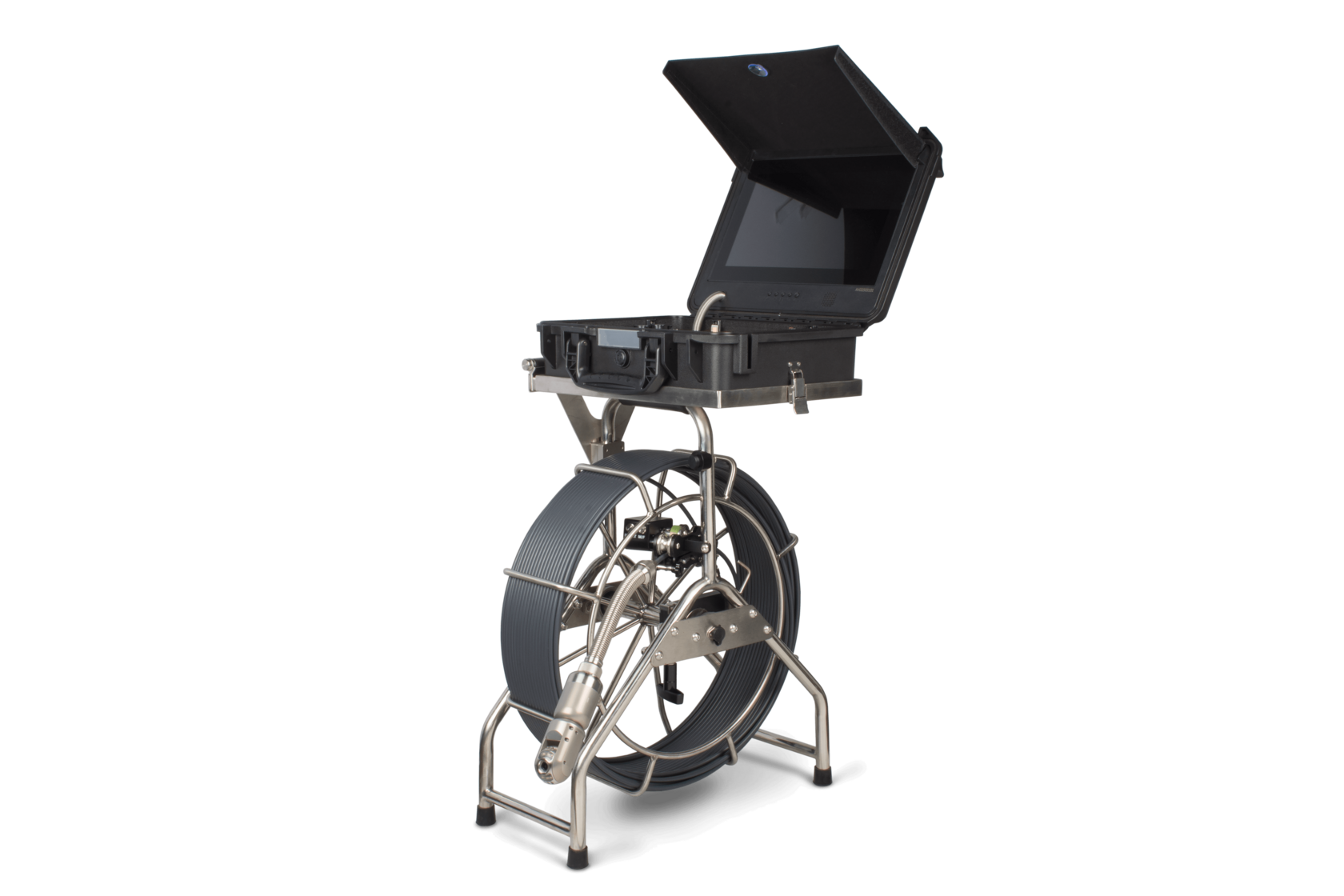
ANACONDA MID
For plumbers and drain contractors with steady 2–20″ work: the push camera class from Example 1, with an aimable head for larger pipe.
- From $5,340 (self-leveling head) or from $7,150 (pan-and-tilt head), both with 196 ft (60 m) cable
- Pan 360°, tilt 160°; 512 Hz sonde in the self-leveling head
- 13″ HD display (1280×720), image/video capture, on-screen footage counter
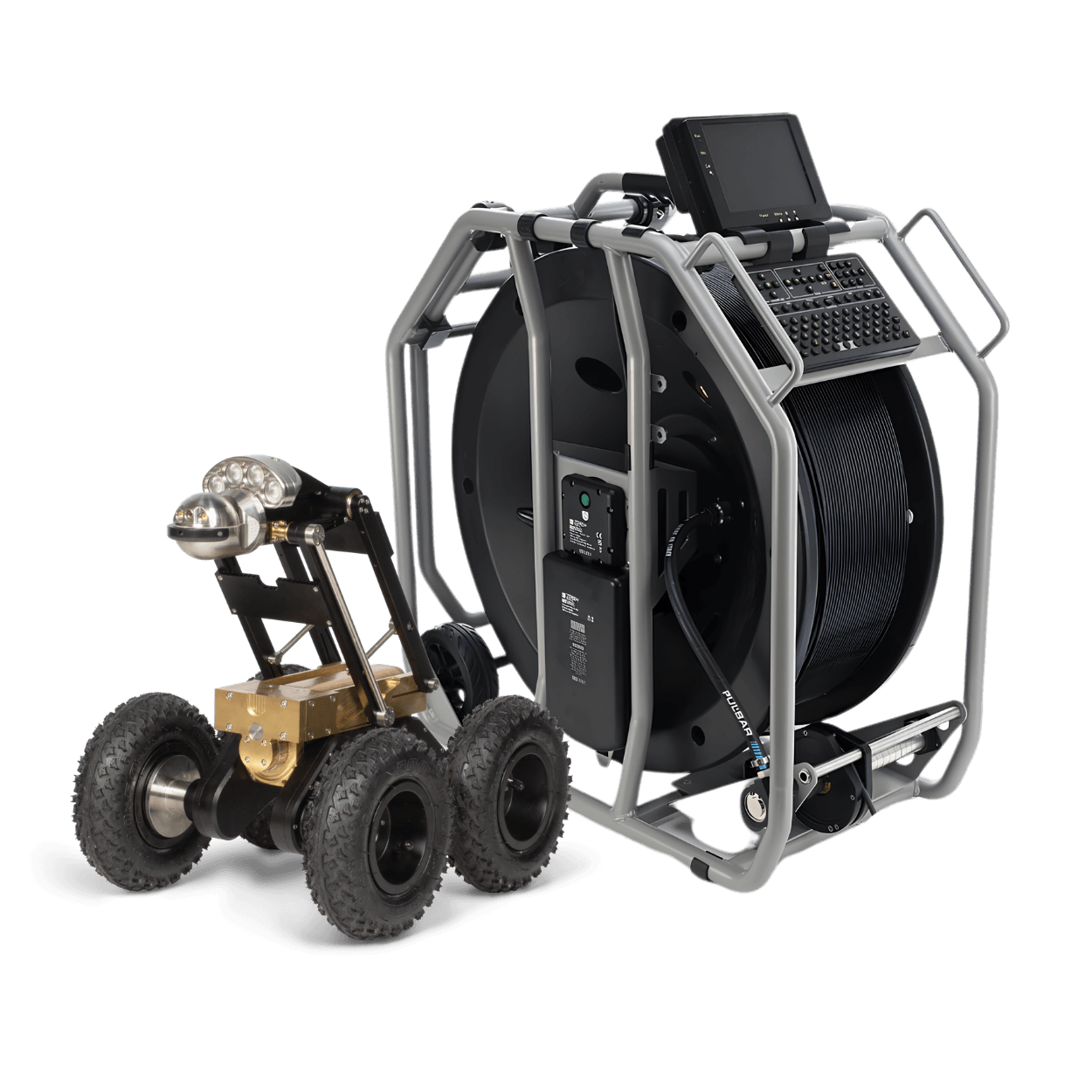
TROGLOTREK
For crews moving into mainline work: rent it while large-diameter jobs are occasional, buy when they are steady (Example 2).
- From $43,625 (pan-and-tilt head, 984 ft / 300 m manual drum) or from $49,125 (motorized drum)
- Centers in 4–39″ pipe, inspects up to 80″; pan-tilt-focus head, reverse camera, built-in sonde and inclinometer
- Battery-powered tractor, reel and control post; single-operator portable; WinCam compatible
Prices are for the basic package and subject to change; ask for a quote on the exact kit. See all push cameras and pipe inspection robots. Budget-minded buyers can also check used equipment. For the wider investment picture, see our pipe inspection investment analysis.
Questions contractors ask
Should I rent or buy a sewer camera?
Buy if you expect steady camera work every month and the monthly cost of owning is less than what those camera days would cost to rent. Rent if the work is occasional, uncertain, or needs a system you don't own. Many contractors rent first and buy once demand is proven.
How many jobs a month do I need to justify buying a sewer camera?
Divide your monthly cost of owning (depreciation, repairs, insurance and finance) by the cost of one rental day. For an entry-level push camera this often works out to one camera day a month or less, so steady demand matters more than volume.
How much does it cost to rent a sewer camera?
Homeowner cost guides report about $120–$225 a day and $350–$780 a week for drain cameras. Larger CCTV systems rent for much more. Add shipping or pick-up time and check who pays for damage.
Can rental fees go toward buying the camera?
Often, depending on the supplier. At Fiberscope.net, 50% of rental fees paid on an eligible unit is credited toward that unit's purchase, and 100% of a demo rental fee is credited toward a new system of a similar model.
What costs do people forget when buying a sewer camera?
Repairs and wear on the push cable and camera head, a sonde locator if you need to mark the line, insurance, storage, training time and the cost of the money. Resale value works in your favor if the camera is well kept.
Is a lease better than buying outright?
A lease or financing keeps cash in the business and matches payments to revenue, but usually costs more in total. Compare the full cost over the term, not the monthly payment.
Run the numbers on your next job
Not sure which camera fits your pipes, access points or budget? Talk to a Fiberscope.net specialist — we also rent equipment if you need it for one job.
Sources
- HomeGuide: Sewer camera inspection cost (inspection prices and drain camera rental rates; page undated, accessed November 2026)
- Angi: How much does a sewer line camera inspection cost? (2025 data)
- GPRS: Rent vs. buy vs. hire a service provider: video pipe inspection (vendor figures for CCTV system rental and purchase)
- Envirosight: Sewer inspection cameras: rent, lease or buy?
- Fiberscope.net: Rental and Demo Policy, rental program, MiniFlex 2, ANACONDA MID and TROGLOTREK product pages (as listed November 2026)
